

Invoice follow-ups that adapt until you get paid
Connect FreshBooks. Rembil runs follow-up on open invoices using status, due dates, and whether the customer has replied.
- FreshBooks connection without a long IT project
- Follow-ups use live invoice status from your books
- Monthly billing. Cancel whenever you need to.
FreshBooks reminders aren't enough
Built-in reminders help, but they are not a full collections workflow. After the first send, someone still has to own the next step, or the invoice can sit open.
- FreshBooks: one scheduled nudge, not an ongoing sequence
- Chasing by hand: the next email is whoever had time that day
- Rembil: follow-up keeps running until the invoice clears or you pause it
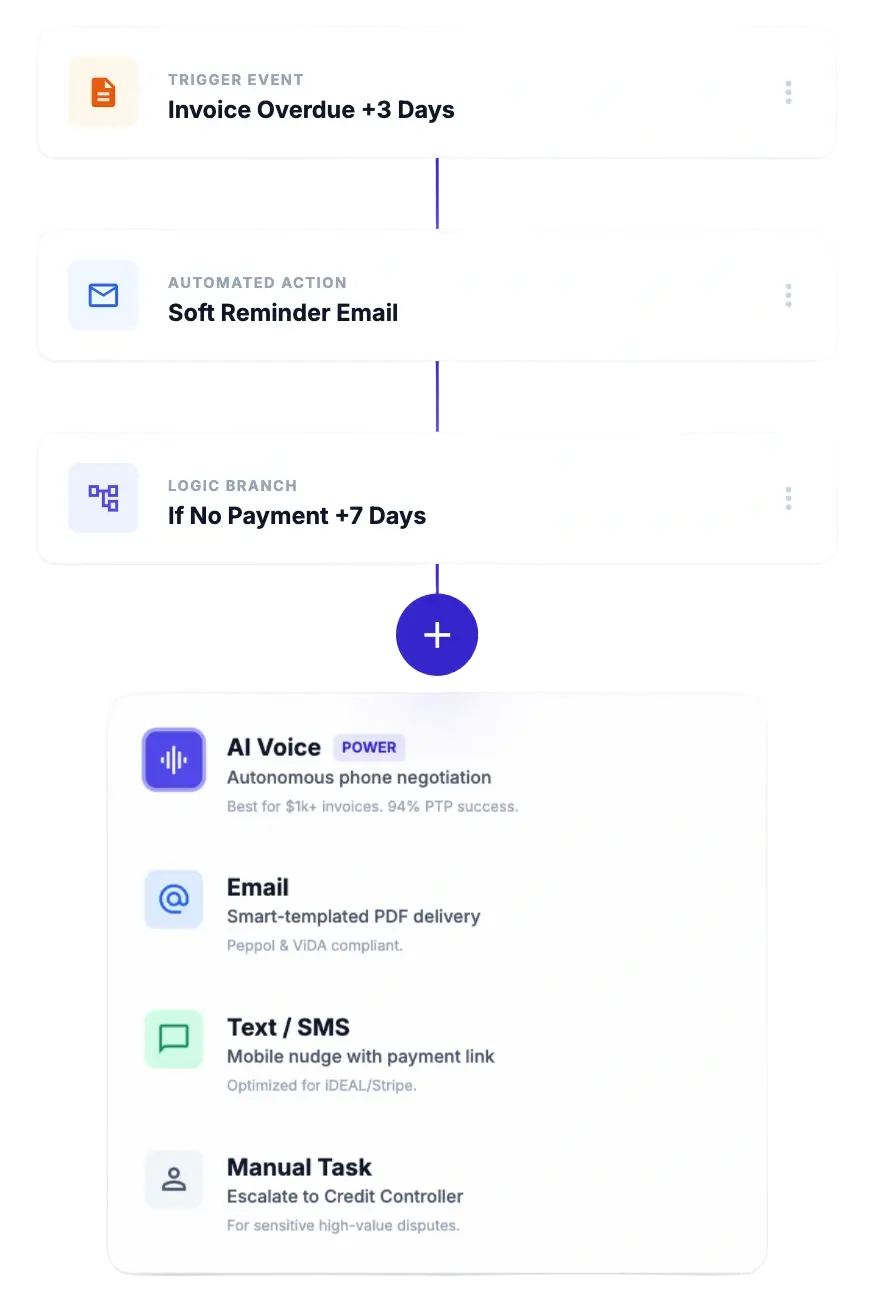
Follow-ups that adapt
Rembil reads live invoice data from FreshBooks. Messages follow what is open and overdue, not a single template on a fixed timer.
Tone and timing follow invoice status: lighter before the due date, firmer when the balance is overdue.
If a client replies with a date they will pay, Rembil pauses and starts again if the money still has not landed.
You do not send the same reminder twice by accident. Each message matches what the ledger shows today.
Amounts and due dates stay accurate because they sync from FreshBooks.
What you get with FreshBooks connected
Live sync, timing by status, reply detection, and per-client rules. Same product as the rest of the site: less manual chasing, clearer receivables work.
Comparison
FreshBooks reminders vs Rembil
FreshBooks can send a reminder. Rembil keeps the follow-up sequence going until the invoice is paid or you stop it.
Plans that scale with your receivables workload
Transparent monthly pricing at $99 and $199 in USD. Need procurement, security, or a custom stack? Enterprise covers it.
Most Popular
Growth
Segmented paths, AI-assisted copy, and deeper sync for growing AR.
Enterprise
Security reviews, custom integrations, and terms that match your procurement.
Same plans and features as on our pricing page.
What customers say
What teams say after connecting Rembil to FreshBooks
Fewer manual chase threads, and reminders that line up with what FreshBooks shows as open.
“We invoice in FreshBooks but the default reminders felt thin. Rembil tied each message to balance and age. Past-due work dropped without me living in email.”
“I did not want another tool that ignores replies. When a client pushes a date, Rembil pauses like a human would, then picks up if they still have not paid.”
“Setup was quick. Open invoices in FreshBooks stay in sync, and I stopped copy-pasting the same follow-up text into Gmail every week.”
Frequently asked questions
Does FreshBooks already support automatic invoice reminders?
FreshBooks can send scheduled reminders. They do not adjust based on full invoice status, do not detect client replies, and do not run a full follow-up sequence. Rembil keeps going until the invoice is paid.
How long does setup take?
Under five minutes. Connect FreshBooks, set your timing preferences, and Rembil starts working with your existing invoices immediately.
What happens when a client says they'll pay on a specific date?
Rembil detects the reply and pauses. If payment arrives, it stops. If not, it picks back up after the promised date without you tracking it in a spreadsheet.
Will my clients know these are automated?
Email comes from your address. You can edit the wording for each stage so it matches how your team writes.
Does it work with QuickBooks or Xero too?
Yes. We support FreshBooks, QuickBooks, and Xero. On another system? Use the contact page and we will tell you if we can help.
Can I control which clients Rembil follows up on?
Yes. Exclude clients, set different rules per client, or pause follow-ups on any invoice at any time.
Still deciding?
Use Get started, or book a demo at the top of the page. We keep replies short and specific to your books.
Get startedStop chasing invoices manually
Connect FreshBooks and let Rembil run the follow-up sequence until invoices are paid or you turn it off.
No long-term lock-in. Cancel when you want. Works with invoices already in FreshBooks.